
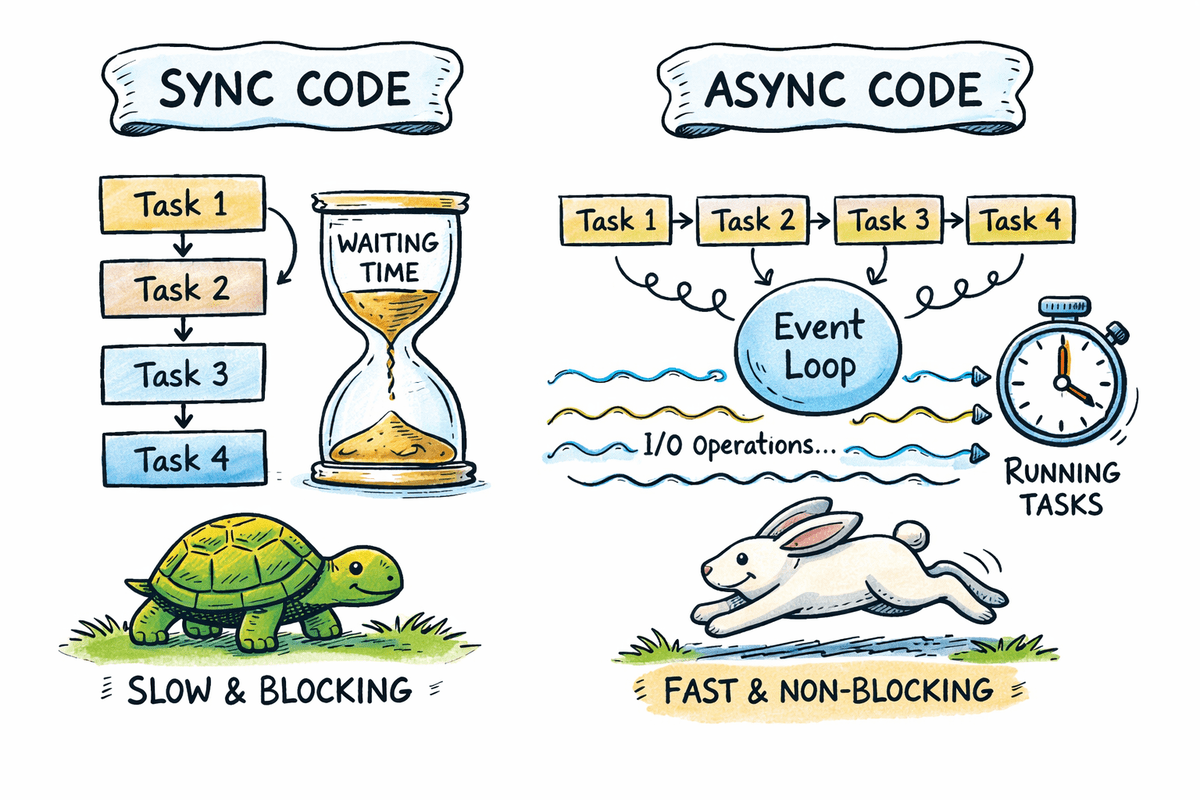
Photo by author
# Introduction
Most Python applications spend a lot of time waiting on APIs, database, file system, and network services. Async programming allows other tasks to be performed instead of stopping and blocking the program while waiting for I/O operations.
In this tutorial, you will learn the fundamentals of async programming in Python using clear code examples. We’ll compare synchronous and asynchronous processes, explain how the event loop works, and apply the async pattern to real-world scenarios such as concurrent API requests and background tasks.
By the end of this guide, you’ll understand when async programming is useful, how to use async and await correctly, and how to write scalable and reliable async Python code.
# Definition of Async Programming in Python
Async programming allows a program to pause execution while waiting for an operation to complete and continue other tasks in the meantime.
The basic building blocks include:
async defTo explain CortesawaitFor non-blocking waits- Event loop for task scheduling
Note: Async improves programming throughput, not raw computation speed.
# Understanding the Async Event Loop in Python
The event loop is responsible for managing and executing asynchronous tasks.
Key responsibilities include:
- Tracking of suspended and completed tasks
- Switching execution while jobs are waiting for I/O
- Integrating synchronicity without threads
Uses Python. asyncio library as its standard async runtime.
# Comparison of Sequential vs. Async Execution in Python
This section demonstrates how blocking sequential code compares to asynchronous concurrent execution and how async reduces the total wait time for I/O-bound tasks.
// Examining a Sequential Blocking Example
Sequential execution runs tasks one after the other. If a task performs a blocking operation, the entire program waits until that operation completes. This approach is convenient but inefficient for I/O-bound workloads where waiting dominates execution time.
This function simulates the blocking task. call to time.sleep Stops the entire program for a specified number of seconds.
import time

def download_file(name, seconds):
    print(f"Starting {name}")
    time.sleep(seconds)
    print(f"Finished {name}")
The timer function starts before the call is made and stops after all three calls are completed. Each function runs only after the previous one has finished.
start = time.perf_counter()

download_file("file-1", 2)
download_file("file-2", 2)
download_file("file-3", 2)

end = time.perf_counter()
print(f"(TOTAL SYNC) took {end - start:.4f} seconds")
Output:
file-1Starts and blocks the program for two seconds.file-2It starts afterfile-1finishedfile-3It starts afterfile-2finished
The total runtime is the sum of all delays, about six seconds.
Starting file-1
Finished file-1
Starting file-2
Finished file-2
Starting file-3
Finished file-3
(TOTAL SYNC) took 6.0009 seconds
// Testing an asynchronous concurrent instance
Asynchronous execution allows tasks to run simultaneously. When a task reaches a pending I/O operation, it stops and allows other tasks to continue. This overlapping of waiting times significantly improves throughput.
This async function defines a coroutine. gave await asyncio.sleep The call only stops the current task, not the entire program.
import asyncio
import time

async def download_file(name, seconds):
    print(f"Starting {name}")
    await asyncio.sleep(seconds)
    print(f"Finished {name}")
asyncio.gather Schedules all three coroutines to run simultaneously on the event loop.
async def main():
    start = time.perf_counter()

    await asyncio.gather(
        download_file("file-1", 2),
        download_file("file-2", 2),
        download_file("file-3", 2),
    )

    end = time.perf_counter()
    print(f"(TOTAL ASYNC) took {end - start:.4f} seconds")
This starts the event loop and runs the async program.
Output:
- All three tasks start at about the same time.
- Each task independently waits for two seconds.
- While one task is waiting, other tasks are continuing.
- The total runtime is close to the longest single delay, about two seconds
Starting file-1
Starting file-2
Starting file-3
Finished file-1
Finished file-2
Finished file-3
(TOTAL ASYNC) took 2.0005 seconds
# Exploring how waiting works in Python Async code
gave await keyword tells Python that a coroutine can stop and allow other tasks to run.
Misuse:
async def task():
    asyncio.sleep(1)
Correct usage:
async def task():
    await asyncio.sleep(1)
Failed to use await Blocks synchronization and may cause runtime warnings.
# Running multiple Async tasks using asyncio.gather
asyncio.gather Allows multiple coroutines to run concurrently and collects their results after all tasks are completed. It is typically used when multiple independent async operations can be executed in parallel.
gave job A coroutine simulates an asynchronous task. It prints an initial message, waits for one second using non-blocking sleep, then prints a complete message and returns the result.
import asyncio
import time

async def job(job_id, delay=1):
    print(f"Job {job_id} started")
    await asyncio.sleep(delay)
    print(f"Job {job_id} finished")
    return f"Completed job {job_id}"
asyncio.gather Schedules all three tasks to run simultaneously on an event loop. Each task starts executing immediately until it reaches a pending operation.
async def main():
    start = time.perf_counter()

    results = await asyncio.gather(
        job(1),
        job(2),
        job(3),
    )

    end = time.perf_counter()

    print("\nResults:", results)
    print(f"(TOTAL WALL TIME) {end - start:.4f} seconds")

asyncio.run(main())
Output:
- All three jobs start at about the same time.
- Each task independently waits for one second.
- While one task is waiting, others continue to run.
- Results are returned in the order in which the tasks were passed.
asyncio.gather - Total execution time is closer to one second, not three.
Job 1 started
Job 2 started
Job 3 started
Job 1 finished
Job 2 finished
Job 3 finished

Results: ('Completed job 1', 'Completed job 2', 'Completed job 3')
(TOTAL WALL TIME) 1.0013 seconds
This pattern is fundamental to concurrent network requests, database queries, and other I/O-bound operations.
# Making concurrent HTTP requests
Async HTTP requests are a common real-world use case where async programming provides immediate benefits. When multiple APIs are called sequentially, the total execution time becomes the sum of all response latencies. Async allows these requests to run simultaneously.
The list contains three URLs that intentionally delay their responses by one, two, and three seconds.
import asyncio
import time
import urllib.request
import json

URLS = (
    "
    "
    "
)
This function performs a blocking HTTP request using the standard library. It cannot be waited for directly.
def fetch_sync(url):
    """Blocking HTTP request using standard library"""
    with urllib.request.urlopen(url) as response:
        return json.loads(response.read().decode())
gave fetch The coroutine measures the execution time and logs when the application starts. Offloaded to a background thread using a blocking HTTP request. asyncio.to_thread. This prevents the event loop from blocking.
async def fetch(url):
    start = time.perf_counter()
    print(f"Fetching {url}")

    # Run blocking IO in a thread
    data = await asyncio.to_thread(fetch_sync, url)

    elapsed = time.perf_counter() - start
    print(f"Finished {url} in {elapsed:.2f} seconds")

    return data
All requests are scheduled using concurrently. asyncio.gather.
async def main():
    start = time.perf_counter()

    results = await asyncio.gather(
        *(fetch(url) for url in URLS)
    )

    total = time.perf_counter() - start
    print(f"\nFetched {len(results)} responses")
    print(f"(TOTAL WALL TIME) {total:.2f} seconds")

asyncio.run(main())
Output:
- All three HTTP requests start almost immediately.
- Each request completes after its own delay.
- The longest request determines the total wall time.
- Total runtime is about three and a half seconds, not including all delays.
Fetching
Fetching
Fetching
Finished  in 1.26 seconds
Finished  in 2.20 seconds
Finished  in 3.52 seconds

Fetched 3 responses
(TOTAL WALL TIME) 3.52 seconds
This approach significantly improves performance when calling multiple APIs and is a common pattern in modern async Python services.
# Implementing Error Handling Patterns in Async Python Applications
Robust async applications should handle failures gracefully. In concurrent systems, a failed task should not cause the entire workflow to fail. Correct error handling ensures that successful tasks are completed while failures are reported cleanly.
This list includes two successful endpoints and one endpoint that returns an HTTP 404 error.
import asyncio
import urllib.request
import json
import socket

URLS = (
    "
    "
    "
)
This function executes a blocking HTTP request with a timeout. This can raise exceptions such as timeouts or HTTP errors.
def fetch_sync(url, timeout):
    with urllib.request.urlopen(url, timeout=timeout) as response:
        return json.loads(response.read().decode())
This function wraps the blocking HTTP request in a safe asynchronous interface. Blocking operations are performed using a background thread. asyncio.to_threadwhich prevents the event loop from stopping while the request is being issued.
Common failure cases such as timeouts and HTTP errors are caught and converted into structured responses. This ensures that errors are handled predictably and that a single failed request does not interrupt the execution of other concurrent tasks.
async def safe_fetch(url, timeout=5):
    try:
        return await asyncio.to_thread(fetch_sync, url, timeout)

    except socket.timeout:
        return {"url": url, "error": "timeout"}

    except urllib.error.HTTPError as e:
        return {"url": url, "error": "http_error", "status": e.code}

    except Exception as e:
        return {"url": url, "error": "unexpected_error", "message": str(e)}
All requests are executed using concurrently. asyncio.gather.
async def main():
    results = await asyncio.gather(
        *(safe_fetch(url) for url in URLS)
    )

    for result in results:
        print(result)

asyncio.run(main())
Output:
- The first two requests complete successfully and return JSON data.
- The third request returns a structural error instead of raising an exception.
- All results are returned together without interrupting the workflow.
{'args': {}, 'data': '', 'files': {}, 'form': {}, 'headers': {'Accept-Encoding': 'identity', 'Host': 'httpbin.org', 'User-Agent': 'Python-urllib/3.11', 'X-Amzn-Trace-Id': 'Root=1-6966269f-1cd7fc7821bc6bc469e9ba64'}, 'origin': '3.85.143.193', 'url': ''}
{'args': {}, 'data': '', 'files': {}, 'form': {}, 'headers': {'Accept-Encoding': 'identity', 'Host': 'httpbin.org', 'User-Agent': 'Python-urllib/3.11', 'X-Amzn-Trace-Id': 'Root=1-6966269f-5f59c151487be7094b2b0b3c'}, 'origin': '3.85.143.193', 'url': ''}
{'url': ' 'error': 'http_error', 'status': 404}
This pattern ensures that a failed request does not break the entire async operation and is essential for production-ready async applications.
# Using Async Programming in Jupyter Notebook
Jupyter notebooks already run an active event loop. Because of this, asyncio.run Cannot be used inside a notebook cell, as it tries to start a new event loop while one is already running.
It simulates a simple non-blocking task using an async function. asyncio.sleep.
import asyncio

async def main():
    await asyncio.sleep(1)
    print("Async task completed")
Misuse in notebooks:
Correct usage in notebooks:
Understanding this difference ensures that async code runs correctly in a Jupyter notebook and prevents common runtime errors when experimenting with asynchronous Python.
# Controlling Concurrency with Async Semaphores
External APIs and services often enforce rate limits, making it unsafe to run many requests at the same time. Async semaphores allow you to control how many tasks execute simultaneously while still benefiting from asynchronous processing.
The semaphore is initialized with a limit of two, meaning that only two tasks can enter the protected section at the same time.
import asyncio
import time

semaphore = asyncio.Semaphore(2)  # allow only 2 tasks at a time
A task function represents an asynchronous unit of work. The semaphore must be acquired before each operation can be performed, and if the limit is reached, it waits until a slot becomes available.
Once inside the semaphore, the task records its start time, prints a start message, and waits for two seconds of nonblocking sleep to simulate an I/O-bound operation. After the sleep completes, the task calculates its execution time, prints a completion message, and releases the semaphore.
async def task(task_id):
    async with semaphore:
        start = time.perf_counter()
        print(f"Task {task_id} started")

        await asyncio.sleep(2)

        elapsed = time.perf_counter() - start
        print(f"Task {task_id} finished in {elapsed:.2f} seconds")
gave main The function schedules four tasks to run simultaneously. asyncio.gatherbut the semaphore ensures that they execute in two waves of two operations.
Finally, asyncio.run The event loop initiates and executes the program, resulting in a total execution time of about four seconds.
async def main():
    start = time.perf_counter()

    await asyncio.gather(
        task(1),
        task(2),
        task(3),
        task(4),
    )

    total = time.perf_counter() - start
    print(f"\n(TOTAL WALL TIME) {total:.2f} seconds")
asyncio.run(main())
Output:
- Tasks 1 and 2 start first due to semaphore limitation.
- Tasks 3 and 4 wait until a slot becomes available.
- Tasks are performed in two waves, each lasting two seconds.
- Total wall time is about four seconds.
Task 1 started
Task 2 started
Task 1 finished in 2.00 seconds
Task 2 finished in 2.00 seconds
Task 3 started
Task 4 started
Task 3 finished in 2.00 seconds
Task 4 finished in 2.00 seconds

(TOTAL WALL TIME) 4.00 seconds
Semaphores provide an effective way to enforce concurrency boundaries and protect system stability in production async applications.
# Concluding Remarks
Async programming is not a universal solution. It is not suitable for CPU-intensive workloads such as machine learning training, image processing, or numerical simulation. Its strength lies in handling I/O-bound operations where waiting time dominates execution.
When used correctly, async programming improves throughput by allowing tasks to progress while others are waiting. Correct use of await Concurrency is essential, and async patterns are particularly effective in API-driven and service-oriented systems.
In a production environment, controlling concurrency and handling failures implicitly is critical to building reliable and scalable async Python applications.
Abid Ali Awan (@1abidaliawan) is a certified data scientist professional who loves building machine learning models. Currently, he is focusing on content creation and writing technical blogs on machine learning and data science technologies. Abid holds a Master’s degree in Technology Management and a Bachelor’s degree in Telecommunication Engineering. His vision is to create an AI product using graph neural networks for students struggling with mental illness.