

Photo by author
# Introduction
Historically, dashboards have been the heart of data visualization. It made sense, because they were scalable: a central place to track key performance indicators (KPIs), slice filters, and export charts.
But when the goal is to explain what’s changed, why it matters, and what to do next, a grid of widgets often turns into a “figure it out” experience.
Now, most audiences expect stories rather than static screens. In an age of short attention spans, it is important to capture people’s attention. They want insight, but also context, construction, and the ability to explore without getting lost.
For this reason, data storytelling has gone beyond simple dashboards. We have entered a new era of experiences that are guided (interactive narratives), spatial (augmented reality (AR) / virtual reality (VR) visualizations), multi-sensory (sonification of data), and deeply exploratory (deep analytics).
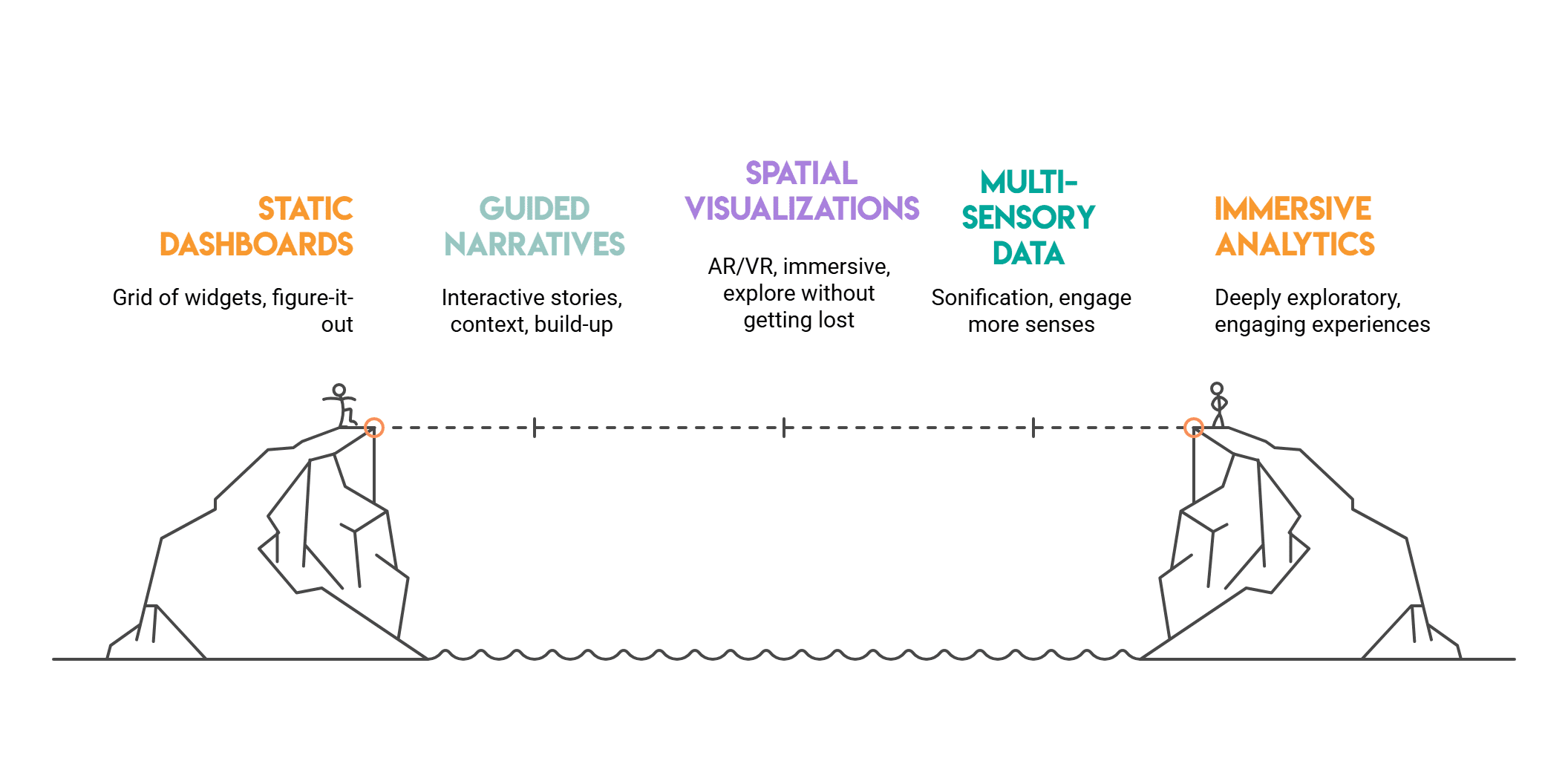
Photo by author
# Why Dashboards Are Reaching Their Limits
Dashboards are very useful if we want to monitor metrics and KPIs, but they struggle with interactive exploration and true storytelling. Some common limitations include:
- They lose context. A chart may show that something went up or down, but not why.
- They get overwhelmed. Too many visuals in one place leads to cognitive overload.
- They are inactive. Users view but do not interact much with the data.
Today’s audience wants more. They don’t just want to see numbers on a screen.
If you want to practice turning raw datasets into real business narratives—not just charts—platforms like StrataScratch Storytelling is a great way to build intuition through real-world SQL and analytics problems.
They’re looking for stories complete with context, flow, dialogue, and even a little drama.
Let’s explore four exciting directions where data storytelling is headed.
# Interactive narratives: letting data unfold like a story
Imagine if your charts told a story one chapter at a time. This is the magic of interactive storytelling. They combine the structure of storytelling with the freedom to explore.
// How interactive stories actually work (scrolls, steps, and scenes)
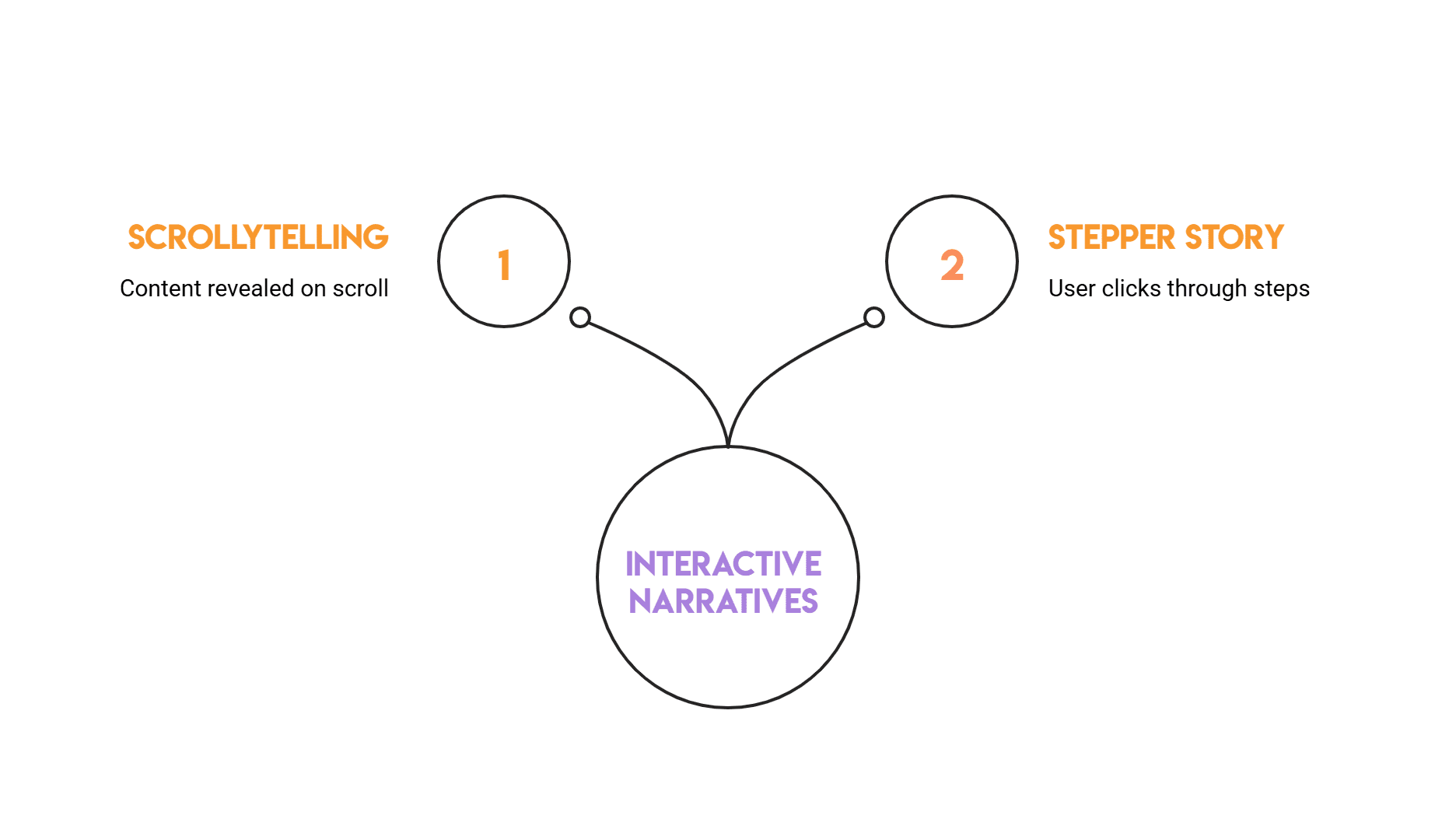
A common and interesting pattern these days is scrolltelling, which combines scrolling and storytelling. It is an online storytelling technique where content appears as the user scrolls down the page. This reflects the behavior that users use today when they scroll through their favorite social media websites.
Another common pattern is a stepper story, which we’ll explore in more detail here. The user clicks step by step to watch the story unfold. An example of a stepper story might go like this:
- Step 1 explains what is going on (e.g. review trends)
- Step 2 characterizes a turning point (can be a simple interpretation).
- Step 3 compares parts (filters or small multipliers).
- Step 4 suggests an action (what to investigate next)
// Stepper example with Plotly
This example creates a small data set and turns it into a narrative using buttons where each button represents a different “chapter” of the story.
import pandas as pd
import numpy as np
import plotly.graph_objects as go

# Sample data: weekly signups with a campaign launch at week 7
np.random.seed(7)
weeks = np.arange(1, 13)
signups = np.array((120, 130, 125, 140, 150, 148, 210, 230, 225, 240, 255, 260))
baseline = np.array((120, 128, 126, 135, 142, 145, 150, 152, 155, 158, 160, 162))

df = pd.DataFrame({"week": weeks, "signups": signups, "baseline": baseline})
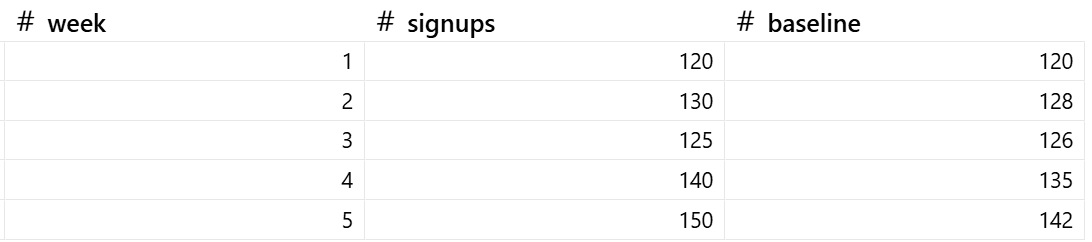
Let’s first examine the simulated data:
Now we create the interactive plot:
fig = go.Figure()

# Trace 0: actual signups
fig.add_trace(go.Scatter(
    x=df("week"), y=df("signups"), mode="lines+markers",
    name="Signups", line=dict(width=3)
))

# Trace 1: baseline (hidden initially)
fig.add_trace(go.Scatter(
    x=df("week"), y=df("baseline"), mode="lines",
    name="Baseline (no campaign)", line=dict(dash="dash"),
    visible=False
))

# Narrative steps using buttons
fig.update_layout(
    title="Interactive Narrative: What changed after the campaign?",
    xaxis_title="Week",
    yaxis_title="Signups",
    updatemenus=(dict(
        type="buttons",
        direction="right",
        x=0.0, y=1.15,
        buttons=(
            dict(
                label="1) Overview",
                method="update",
                args=({"visible": (True, False)},
                      {"annotations": ()})
            ),
            dict(
                label="2) Highlight change",
                method="update",
                args=({"visible": (True, False)},
                      {"annotations": (dict(
                          x=7, y=df.loc(df("week")==7, "signups").iloc(0),
                          text="Campaign launch", showarrow=True, arrowhead=2
                      ))})
            ),
            dict(
                label="3) Compare to baseline",
                method="update",
                args=({"visible": (True, True)},
                      {"annotations": (dict(
                          x=7, y=df.loc(df("week")==7, "signups").iloc(0),
                          text="Uplift vs baseline starts here", showarrow=True, arrowhead=2
                      ))})
            ),
        )
    ))
)

fig.show()
Output:
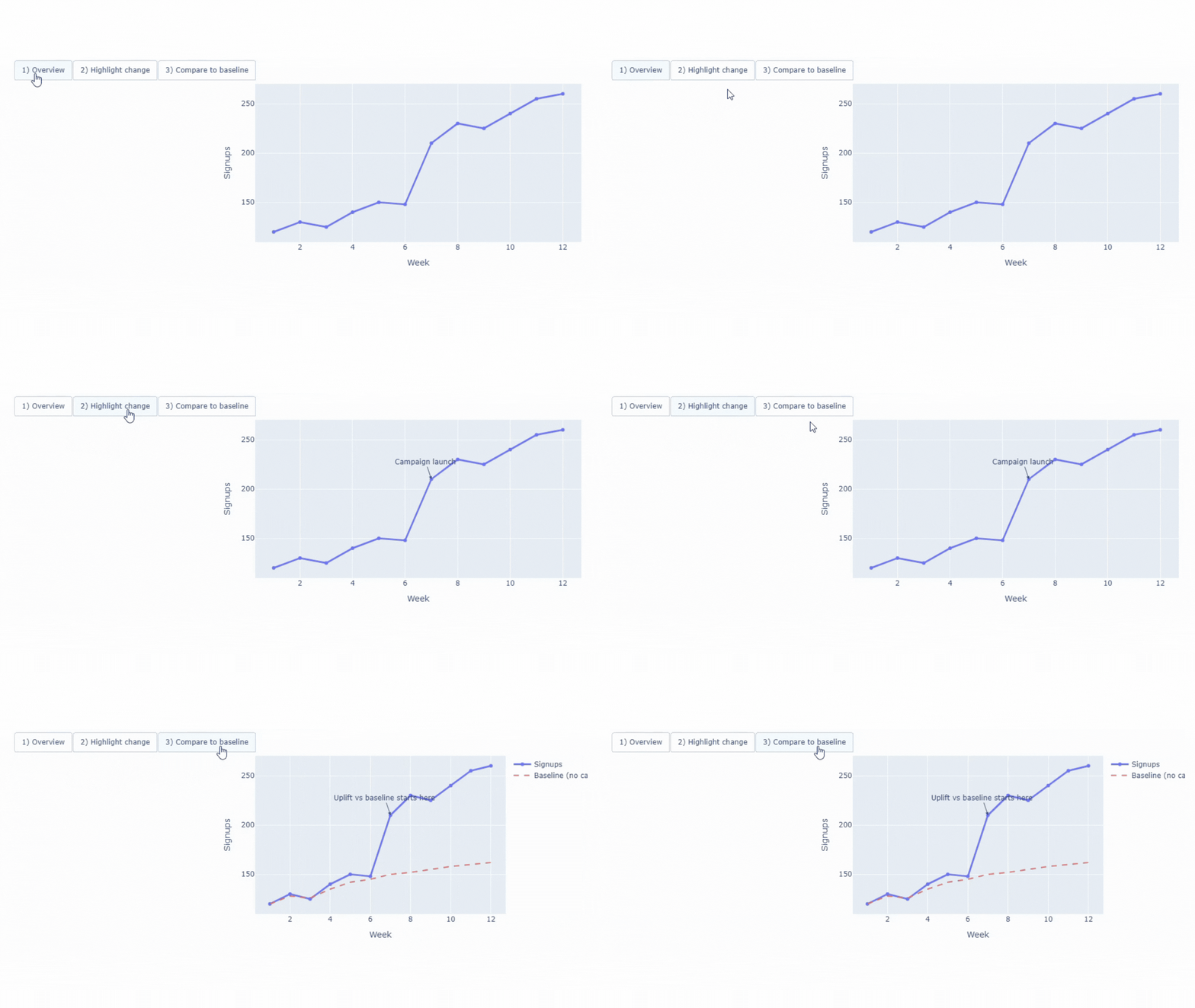
We can see that interactive buttons turn a chart into a guided story. It is obvious why this type of concept attracts the attention of the public.
This type of chart works best for product adoption, quarterly reports, investor updates and other cases where you want to guide the audience. In short, this is a useful technique when you want people to understand the main point step by step.
# AR and VR Concepts: Transforming Data into a Space You Can Explore
AR adds data on top of the real world. For example, one can see numbers or charts on top of real machines or buildings.
VR puts you in a completely digital world. You can move around and explore the data as a virtual space.
Both types of visualizations use 3D space to represent data as an environment. The point isn’t just to look cool, but to make relationships like distances, sizes, and groups easy to understand.
// Where AR/VR are useful.
- When we want to display information directly on physical hardware.
- When we want to walk around and see how buildings or cities look in different situations.
- When we want to simulate in three dimensions, investigate outer space, or the microscopic world.
- When individuals want to evaluate changes, test concepts, and evaluate outcomes before committing to real-world actions.
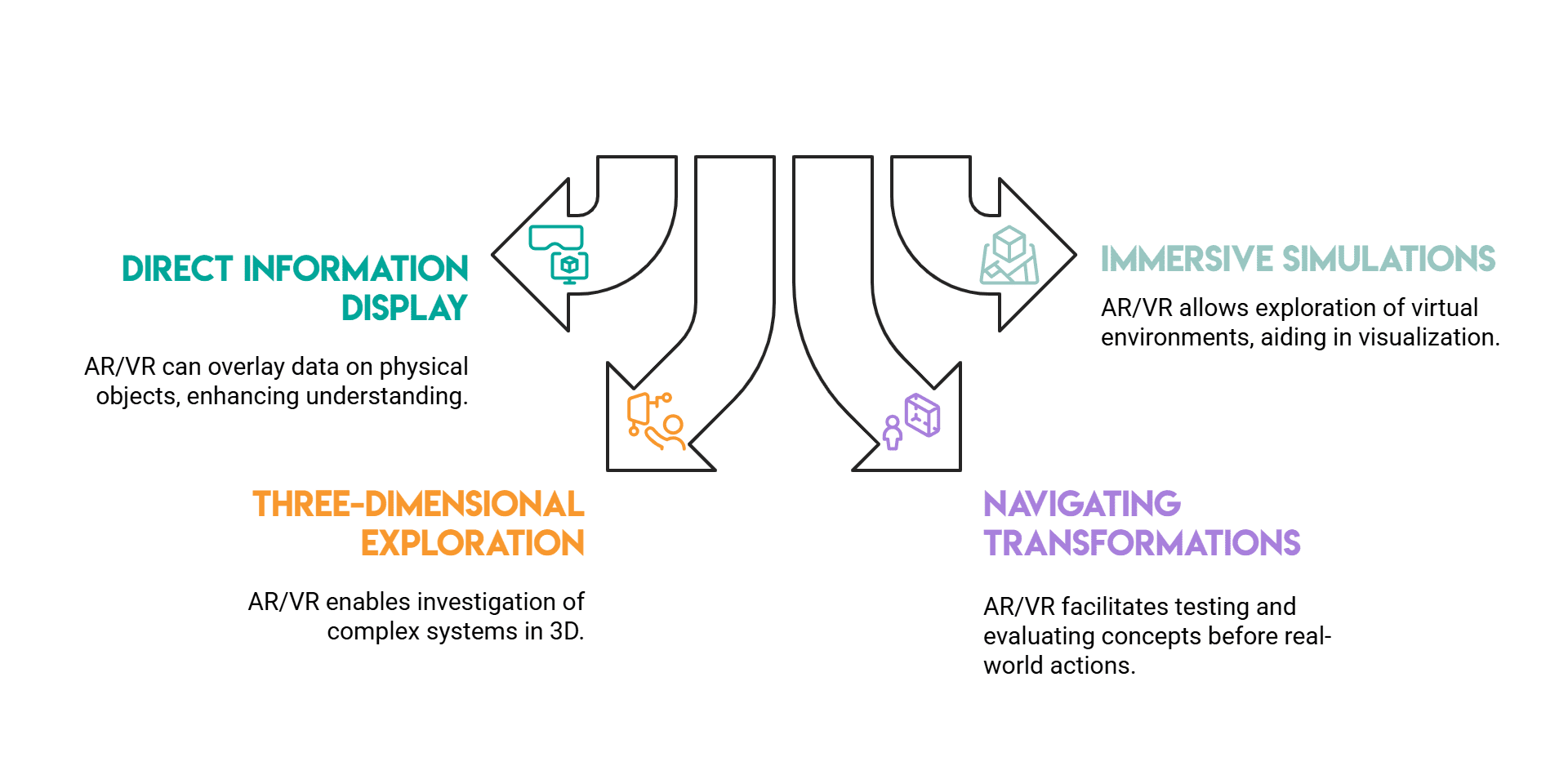
Photo by author
// 3D bar chart ready for VR
Here we use A-frame And Web XR To create a small 3D bar chart that runs in the browser. Each bar is a category, and longer bars mean higher values.
This scenario runs in a standard desktop browser or a VR headset that supports WebXR. No complicated setup is required.

The output, in the browser, looks like this:

How to run this example locally:
- Save the file as
vr-bars.html - Open Terminal in the same folder.
- Start a simple local server with Python:
python -m http.server 8000 - Open your browser and go to:
It’s best to open the file through a local server because some browsers limit WebXR’s features when trying to open raw HTML files directly.
# Sonification: When data becomes sound.
Sonification means converting data into sound. Numbers can be high or low sounds, high or low sounds, or even short and long sounds.
One might think that this does not add to the dynamics of our data visualization. However, sound can help us notice patterns, changes, or problems, especially if the data changes over time.
// Best Use Cases for Voice-Based Data Insights
- Monitoring systems (strange or unusual sounds are easily detected)
- Accessible (audio helps those who cannot rely on charts or visuals alone)
- Dense time series (makes it easier to hear rhythmic patterns and sudden spikes)
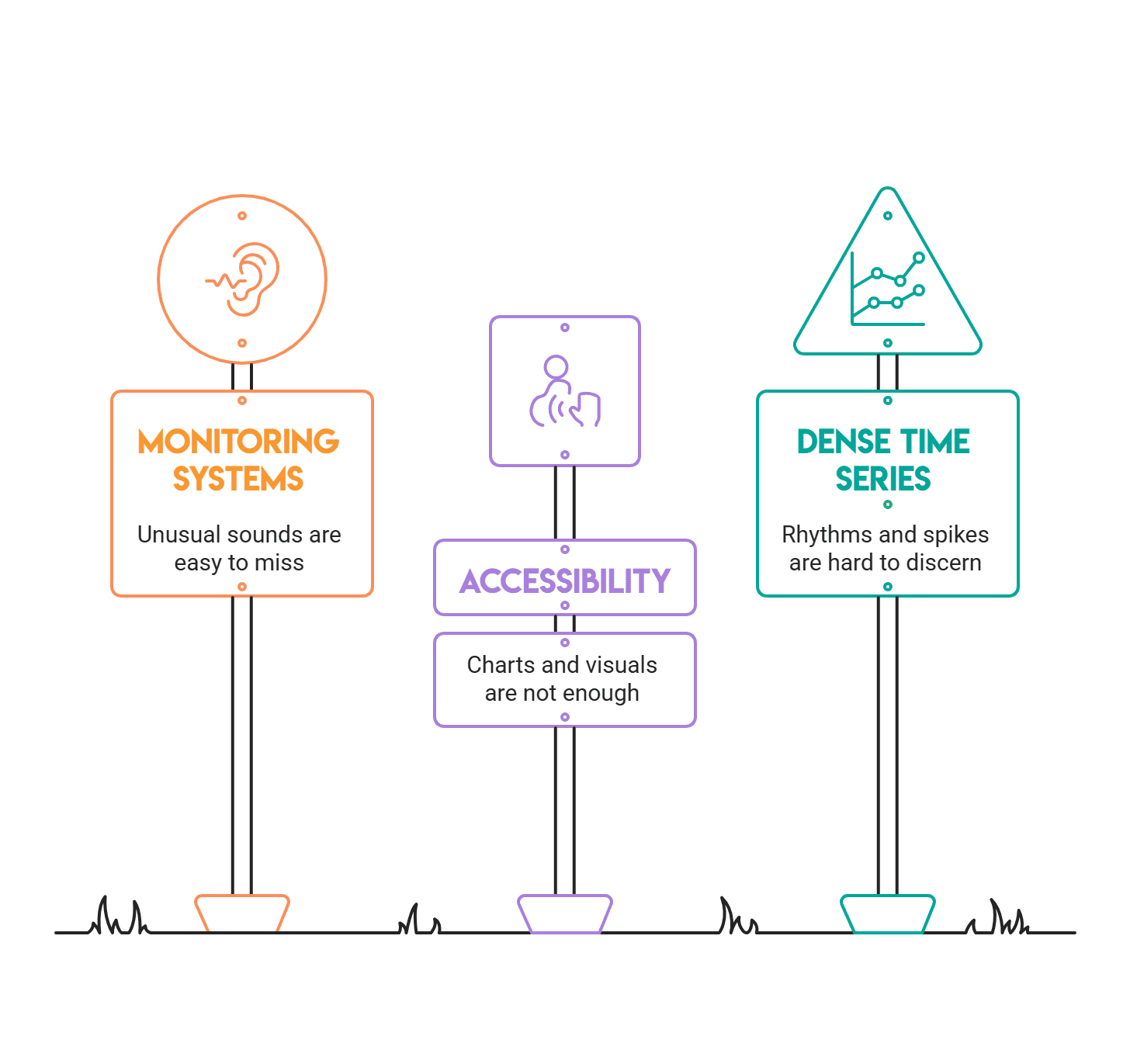
Photo by author
// Converting time series to tones
Here, every value is transformed into a musical pitch. Notes are simple sine sounds, with small intervals between them to clarify the order.
This version is for Jupyter Notebook (or JupyterLab / Google Colab). It uses IPython.display.Audio To play sound directly into the output cell, there is therefore no need to install system audio libraries.
import numpy as np
from IPython.display import Audio, display

# Example: daily website visits (small time series)
visits = np.array((120, 118, 121, 130, 160, 155, 140, 138, 200, 180))

min_f, max_f = 220, 880  # A3 to A5
v_min, v_max = visits.min(), visits.max()

def scale_to_freq(v):
    if v_max == v_min:
        return (min_f + max_f) / 2
    return min_f + (v - v_min) * (max_f - min_f) / (v_max - v_min)

sample_rate = 44100
note_dur = 0.18  # seconds per note
gap = 0.03       # silence between notes

audio_all = ()

for v in visits:
    freq = scale_to_freq(v)
    t = np.linspace(0, note_dur, int(sample_rate * note_dur), endpoint=False)
    tone = np.sin(2 * np.pi * freq * t)

    # Fade out to reduce clicks
    fade = np.linspace(1, 0, len(tone))
    tone = 0.3 * tone * fade

    audio_all.append(tone)
    audio_all.append(np.zeros(int(sample_rate * gap)))

audio = np.concatenate(audio_all)

display(Audio(audio, rate=sample_rate))
You can listen to the output. Here.
Click play to listen to it. When the number of visits is high, the volume is also high, making the spikes easier to hear.
To turn it into a more storytelling environment, add a small line chart and highlight key moments like spikes, drops, and trend breaks. A useful addition is to play audio showing the line over time, so readers can see and hear the shift.
# Immersive Analytics: Exploring data by moving it through it
Immersive analytics is when we explore data in a way that’s more like moving and touching things than just clicking buttons or filters.
Profoundness comes from:
- When data is being displayed in 3D or placed in space it makes things easier to understand.
- Ability to move sliders, select parts of data and change view, with data updating instantly.
- Changes to one chart cause other charts to be updated as well.
// Interactive 3D exploration
This example uses tactfully We can flip and filter to show a 3D chart. This is not a standard dashboard. It is a tool for exploring and interacting with data.
Run this in a Jupyter notebook:
import numpy as np
import pandas as pd
import plotly.express as px
import ipywidgets as widgets
from IPython.display import display

# Synthetic multi-dimensional data
np.random.seed(42)
n = 800
df = pd.DataFrame({
    "x": np.random.normal(0, 1, n),
    "y": np.random.normal(0, 1, n),
    "z": np.random.normal(0, 1, n),
})
df("score") = (df("x")**2 + df("y")**2 + df("z")**2)

slider = widgets.FloatSlider(
    value=float(df("score").quantile(0.90)),
    min=float(df("score").min()),
    max=float(df("score").max()),
    step=0.05,
    description="Score ≤",
    readout_format=".2f",
    continuous_update=False
)

out = widgets.Output()

def render(threshold):
    filtered = df(df("score") <= threshold).copy()
    fig = px.scatter_3d(
        filtered, x="x", y="y", z="z", color="score",
        title="Immersive analytics (lite): rotate + filter a 3D space",
        opacity=0.75
    )
    fig.update_traces(marker=dict(size=3))
    fig.show()

def on_change(change):
    if change("name") == "value":
        with out:
            out.clear_output(wait=True)
            render(change("new"))

slider.observe(on_change)

display(slider, out)
render(slider.value)
Here is the output:

To improve this, you can let people select points, show selected rows in the table, or draw lines around clusters. This works well when you lead exploration during a meeting. For example, you can start with a step-by-step route, then let people discover on their own.
# The result
The future of data storytelling won’t be about removing dashboards entirely. Instead, we’ll see a trend toward more interactive and immersive stories about data, models, and insights.
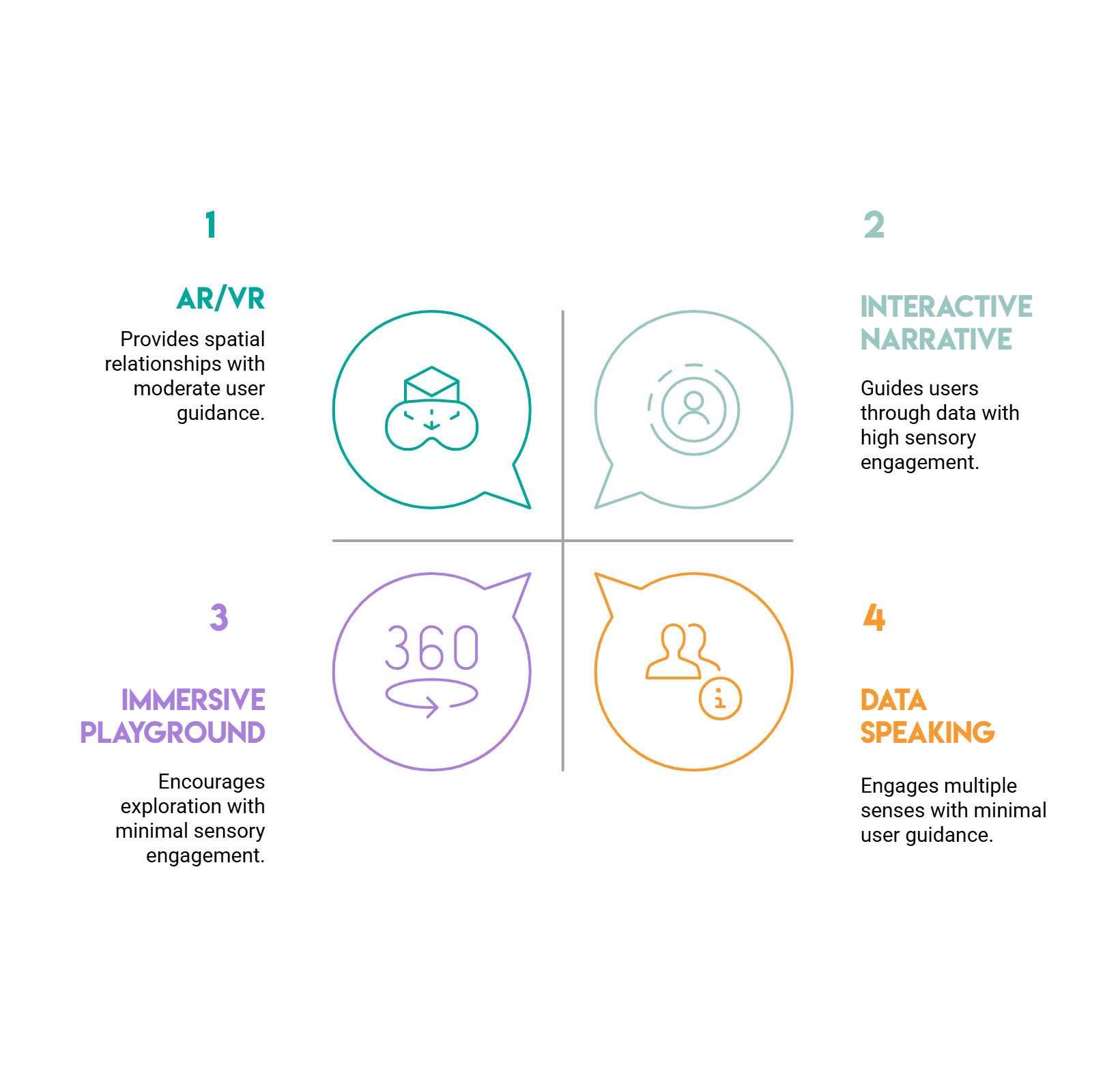
Photo by author
In a nutshell, here’s how one can choose the best type of data visualization:
- Want to mentor someone? Try an interactive narrative.
- Need to show local ties? AR/VR can help.
- Hoping to reach more senses? Let your data speak.
- Want to invite exploration? Create an immersive playground.
The best part is that you don’t need a big budget or a team to try it out.
Pick a technique and build a small prototype. A little stepper or 3D bar, a sonified line chart or a slider-based filter. You’ll be surprised how quickly your data starts to feel like a story.
Net Rosiedi A data scientist and product strategist. He is also an adjunct professor teaching analytics, and the founder of StrataScratch, a platform that helps data scientists prepare for their interviews with real interview questions from top companies. Nate writes on the latest trends in the career market, gives interview advice, shares data science projects, and covers all things SQL.