
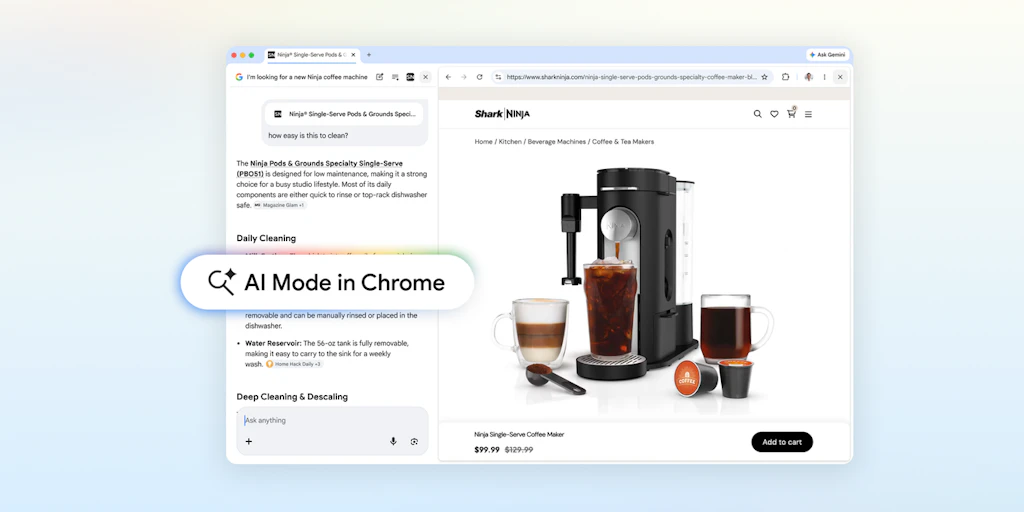
The way most people use a browser hasn’t changed in 20 years: open a tab, search, open another tab, lose your place, repeat.
AI Mode in Chrome is Google’s answer to this. It’s a native Chrome upgrade that puts your search results and the web pages you’ve visited in one view, so your research stays connected instead of scattered.
What is this: Experience an updated AI mode built into Chrome Desktop that displays web content and searches simultaneously, with support for adding open tabs, images, and files as search context.
Problem -> Solution: Switching between searching and browsing breaks your train of thought. AI Mode in Chrome puts both together. Click on a link and the site will open with your search, AI ready to answer the questions on that particular page.
What makes it different: The multi-input layer is the interesting part. You can feed multiple open AI mode tabs simultaneously, not just one page at a time. Combine that with PDF and image support and it starts to resemble a research workspace more than a search box.
Key Features:
Side-by-side web and search view on Chrome desktop
Plus menu for adding open tabs, images, or PDFs as context
Access to canvas and image creation tools within a single interface
Who is it for: Intermediate research students, multi-document extraction professionals, and anyone whose browser sessions routinely devolve into tab chaos.
Honesty Note: US only for now, no confirmed world dates.